[et_pb_section fb_built=”1″ _builder_version=”4.18.1″ _module_preset=”default” background_color=”#fff7ee” locked=”off” collapsed=”off” global_colors_info=”{}”][et_pb_row _builder_version=”4.18.1″ _module_preset=”default” custom_css_main_element=”width:80% !important;” collapsed=”off” global_colors_info=”{}”][et_pb_column type=”4_4″ _builder_version=”4.18.1″ _module_preset=”default” global_colors_info=”{}”][et_pb_text _builder_version=”4.19.0″ _module_preset=”default” text_text_color=”#424242″ text_font_size=”16px” hover_enabled=”0″ global_colors_info=”{}” sticky_enabled=”0″]
For small-medium business owners who don’t have a website, collecting online payments and managing their transactions can be a challenge. This is where NowNow payment link plays a vital role.
In this article, we’re going to explain just what NowNow Payment link is, how it works, and how using it can benefit your business.
What are Payment Links?
Payment Links are links or URLs that can be used to accept online payments anywhere or anytime. Essentially, it is a ‘Pay Now’ button that prompts customers to pay.
Once a customer clicks the payment button, they’re taken to a payment page showing the amount due. Payment is secured through the link while you get real-time notifications for payment received.
How Does it work?
Creating a payment link is super easy!
First, you (merchant) create a payment link from the NowNow app and send it to your customer. Then, the customer clicks on the link and can select the preferred payment source to complete the transaction online.
Creating a payment link only takes a minute. Plus, they are super easy to generate! Once created, you can share with your customers via SMS, email, WhatsApp or even on social media accounts to get paid easily.
Interestingly, payment links can be sent to multiple customers to request payment. They are not one-time links that deactivate automatically once a transaction takes place. Processing payments via link sharing is the easiest and fastest way for both customers and merchants.
Benefits of Payment Links For Customers
- Access payment links from various sources including debit cards, NIP, digital wallets
- Ease of making remote payments from anywhere
- Payment security
Benefits of Using Payment Links For Businesses
- Accept online payments without a website or app
- Easy to create and share payment links with customers
- Send reminder requests for customers to pay on time
- Option of collecting partial payment
- Option to create multiple payment links at once to save time
- Collect payments remotely for home deliveries
Scenarios where NowNow Payment Links is ideal
NowNow Payment Links can help you accept payments online from customers when
You do not have your business website or app.
Your business is mainly on your social media pages, WhatsApp etc
You need to backup your online payments system: In cases where your customers are unable to make payments on your website, you can send NowNow Payment Links as an alternative.
You offer home delivery services: You can send NowNow Payment Links in situations where your customers do not have sufficient cash to pay for home deliveries.
How to create NowNow Payment Links
Creating and sharing NowNow Payment Links is super easy
Let’s walk you through how it works.
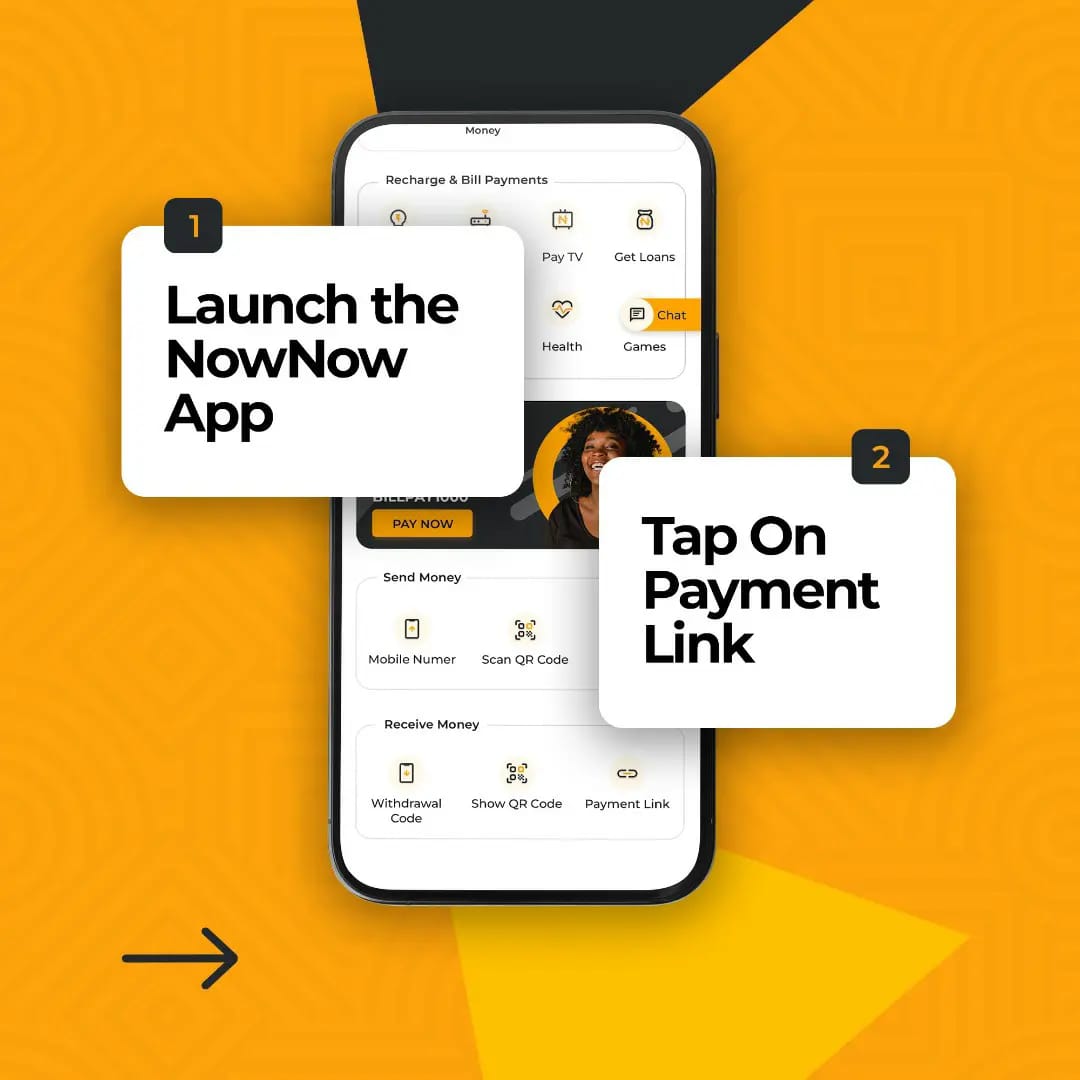
Step #1: Log into your NowNowapp account
You need to sign in to your wallet by entering your registered mobile phone number or mPIN. Download the app from Google Play or Apple store if you don’t have the App.
Step #2: Go to Payment Link under the Receive Money tab
Fill in the details.
Step #3: Click Receive money
Get ready to start receiving notifications for payments.
Bottom Line
Every online business needs a fast, secure and convenient payment solution to ensure your customers have a good experience with your payment process.
[/et_pb_text][/et_pb_column][/et_pb_row][/et_pb_section][et_pb_section fb_built=”1″ admin_label=”recent news” _builder_version=”4.18.1″ _module_preset=”default” locked=”off” collapsed=”on” global_colors_info=”{}”][et_pb_row _builder_version=”4.18.1″ _module_preset=”default” global_colors_info=”{}”][et_pb_column type=”4_4″ _builder_version=”4.18.1″ _module_preset=”default” global_colors_info=”{}”][et_pb_text module_class=”recent-news-section” _builder_version=”4.18.1″ _module_preset=”default” global_colors_info=”{}”][frontpage_news widget=”6170″ name=”blog”]
[/et_pb_text][/et_pb_column][/et_pb_row][/et_pb_section][et_pb_section fb_built=”1″ admin_label=”Orange-section” _builder_version=”4.17.4″ _module_preset=”default” background_color=”#f78b00″ custom_margin=”0px||0px||false|false” custom_padding=”0px||0px||false|false” locked=”off” collapsed=”on” global_colors_info=”{}”][et_pb_row _builder_version=”4.17.4″ _module_preset=”default” custom_margin=”0px||0px||false|false” custom_padding=”50px||0px||false|false” global_colors_info=”{}”][et_pb_column type=”4_4″ _builder_version=”4.17.4″ _module_preset=”default” global_colors_info=”{}”][et_pb_code _builder_version=”4.18.0″ _module_preset=”default” custom_margin=”0px||0px||true|false” custom_padding=”0px||0px||true|false” global_colors_info=”{}”]
Download the NowNow app today to enjoy the New New way to bank
Available On


[/et_pb_code][/et_pb_column][/et_pb_row][/et_pb_section]